
Segment and Tag Editors

v

3.2.3

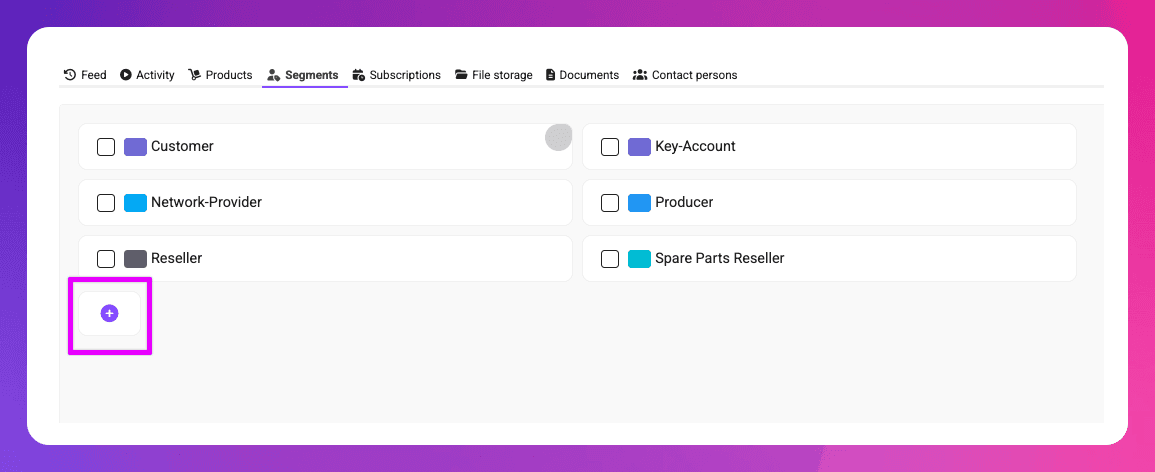
Adding segments is now faster and more convenient. You no longer need to open the settings to create a new segment - segments can now be added directly from within the contact view. Existing segments can also be edited right there.
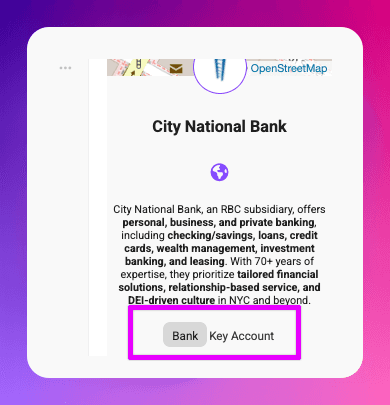
If creating a new segment feels too heavy for a quick idea, using tags is often the better choice. To make this easier, tags can now be added and edited directly from the contact view’s side panel - no need to open the contact edit dialog anymore.
How to install?

There's no need to do anything. If you are a user of Mister James already, all updates get installed to your instance, automatically. If you are missing something, try to refresh Mister James within your Browser (by Pressing Ctrl+F5 on Windows or Cmd+R on MacOS).

CRM-System Mister James

Empower your business.

English

© Copyright 2025 by Rowisoft GmbH. All rights reserved.

Various trademarks held by their respective owners. Mister James and Rowisoft are trademarks of the Rowisoft GmbH.

CRM-System Mister James

Empower your business.

English

© Copyright 2025 by Rowisoft GmbH. All rights reserved.

Various trademarks held by their respective owners. Mister James and Rowisoft are trademarks of the Rowisoft GmbH.

CRM-System Mister James

Empower your business.

English

© Copyright 2025 by Rowisoft GmbH. All rights reserved.

Various trademarks held by their respective owners. Mister James and Rowisoft are trademarks of the Rowisoft GmbH.

CRM-System Mister James

Empower your business.

English

© Copyright 2025 by Rowisoft GmbH. All rights reserved.

Various trademarks held by their respective owners. Mister James and Rowisoft are trademarks of the Rowisoft GmbH.