
Upload your PDF Quotes
v
3.2.3
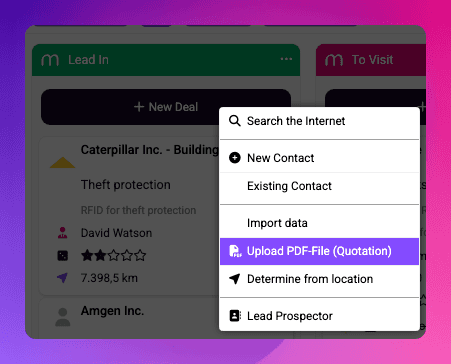
You can either drag and drop a PDF file from your computer onto a specific stage in your sales pipeline, or click the “New Deal” button and select “Upload PDF File (Quotation)” from the menu.
Mister James automatically parses the content of the PDF, creates a new contact if necessary, and generates a short description of the document for the deal.
In addition, the PDF file is automatically stored in the appropriate section of the Orders area in Mister James — for example Quotations, Invoices, or Letters.
Give it a try today! 🚀
How to install?
There's no need to do anything. If you are a user of Mister James already, all updates get installed to your instance, automatically. If you are missing something, try to refresh Mister James within your Browser (by Pressing Ctrl+F5 on Windows or Cmd+R on MacOS).