





Do I need programming skills?
No. You copy the MCP address, add it as a connector in your AI app and sign in. No API key, no code.
Model Context Protocol (MCP)
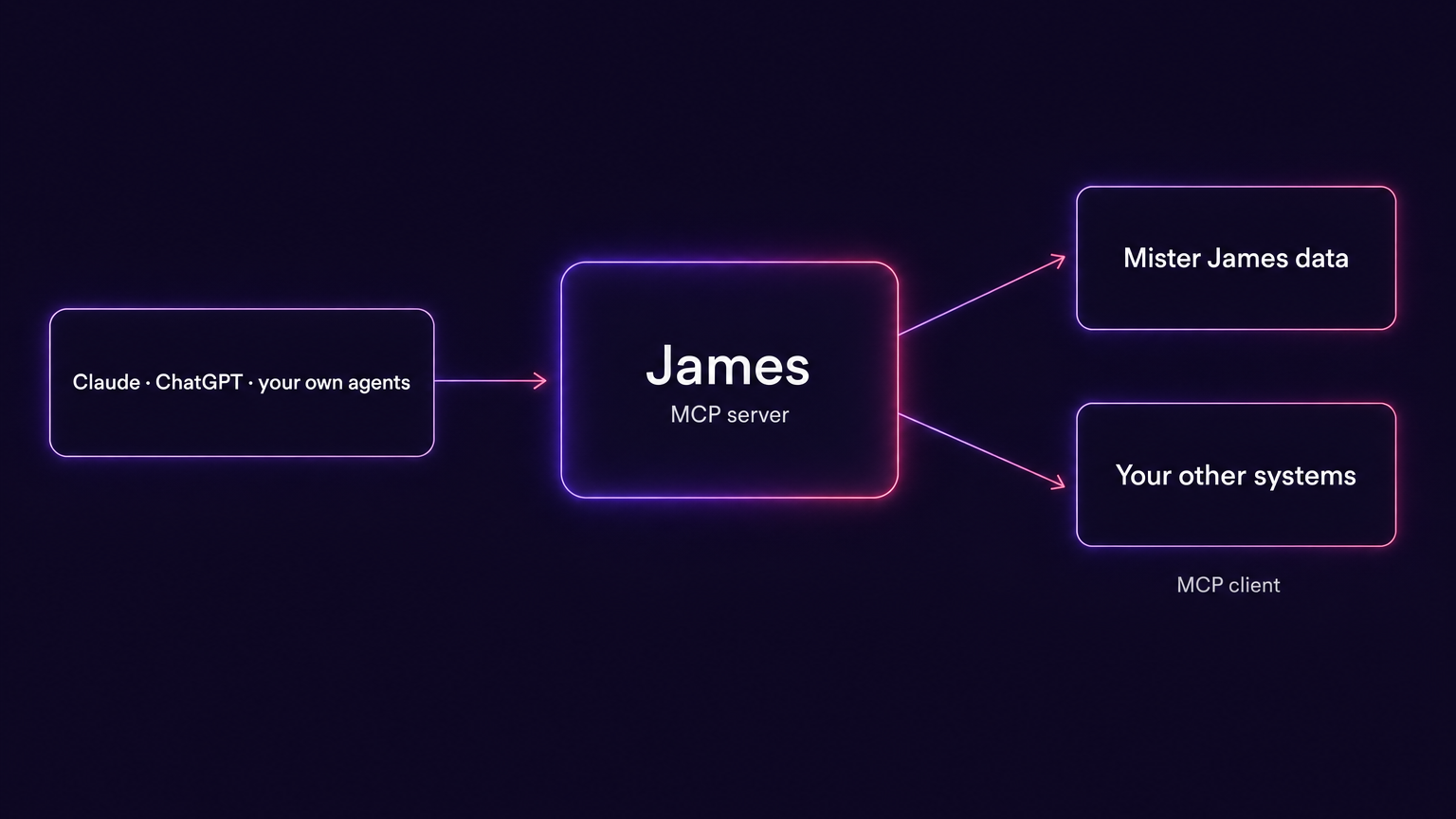
Mister James provides an MCP server at conversation level: connected apps don't receive a list of individual functions – they talk to James. James plans the work, uses your data with your permissions and asks for your approval before anything is sent, deleted or charged. As an MCP client, Mister James also connects your other systems to James.
Demo of the Ultimate edition, James included.
Open standard: MCP over Streamable HTTP
Sign-in with OAuth 2.1
Same permissions as in Mister James
AI apps such as Claude or ChatGPT can write, summarize and analyze, but they have no access to your company's data. The Model Context Protocol (MCP) is an open standard that closes this gap. It defines how an AI app connects to other software, signs in and uses it. Many AI apps support it today.
Software that offers its functions to AI apps. Mister James is an MCP server, so Claude, ChatGPT or your own agents can work with Mister James.
Software that uses other MCP servers. Mister James is an MCP client too, so James can use your other systems – for example your wiki or your ticketing system.
The AI app signs in with your Mister James account. It can do exactly what you are allowed to do in Mister James, and nothing more.
Most MCP servers work at tool level. They expose each function separately – search contact, read quote, update record – and the AI app decides which functions to call in which order. That works well for single, clearly defined actions. For business processes that span several records and steps, the AI app has to know the data model, plan the chain of calls and handle every intermediate result itself.
Mister James works at conversation level. The AI app passes the request to James in natural language. Planning, data access and execution happen on the server, where the knowledge about Mister James and your data is.
“Which quotes are older than a week and still open? Create a follow-up for each one.”
The AI app has to find the relevant functions, work out what counts as an open quote, page through the quotes, compare dates, assign contacts and deals, and create each follow-up in a separate call.
The AI app sends the sentence to James. James applies the definition of an open quote, finds the matching quotes, creates the follow-ups and returns the result.
| Tool level | Conversation level (Mister James) | |
|---|---|---|
| Interface | Many individual functions | Three tools: ask, wait, decide |
| Planning | In the AI app | On the Mister James server |
| Business knowledge | The AI app has to know the data model | James knows the definitions, for example revenue vs. payments received, contact vs. customer |
| Long-running jobs | Limited by the duration of a single call | The job keeps running; status and result are fetched later |
| Missing information | The AI app has to guess or stop | James asks a question with answer options |
| Sending, deleting, costs | Depends on the server | Always an approval by the user |
| Conversation history | In the AI app only | Also stored as a chat in Mister James |
Every request through MCP becomes an ordinary James chat of the signed-in user. These are the steps:
Your AI app passes your request to James in natural language.
Technical: ask_james with message, optional chat_id and mode
Mister James checks the sign-in, your team membership, your James permissions and the available credits.
Technical: OAuth access token, checked on every call
James plans the job, finds the data through a business data catalog and uses Mister James functions and dedicated AIs, for example for newsletters, landing pages or presentations.
Technical: server-side orchestrator; figures come from verified datasets
Before anything is sent, deleted or charged, James asks for approval. Your AI app shows you the request; you can also decide in Mister James.
Technical: approval_required → decide_james_approval
If a job takes longer than 50 seconds, the AI app receives a status with progress lines and fetches the result later.
Technical: working → wait_for_james
James answers in your language; tables arrive as readable tables. The conversation is saved as a chat in Mister James.
Technical: text plus structuredContent; chat_id for follow-up requests
Everything James can do in Mister James is available through MCP. Some typical requests:
If your AI app also has access to other sources, such as documents, it can pass their content to James: “Add everyone on this attendee list as a contact tagged Workshop.”
Your own AI agents can hand business tasks to James through MCP, without a separate integration against individual API endpoints.
The MCP server follows the same rules as the James chat in Mister James. A connected app cannot bypass any of them.
You sign in through Mister James and confirm which app gets access. No API key is copied.
Technical: Mister James is its own authorization server per the MCP specification: PKCE (S256), Dynamic Client Registration (RFC 7591), Protected Resource Metadata (RFC 9728), Authorization Server Metadata (RFC 8414), Resource Indicators (RFC 8707), iss validation (RFC 9207), token revocation (RFC 7009).
Sending, deleting and costs require your decision.
Technical: approval with title, summary and expiry time; decided in the client or in Mister James through the same path as in the app, safe against replays; the decision tool is marked destructiveHint.
The app receives access that is valid for James only.
Technical: opaque tokens valid only for the MCP endpoint, never a Mister James session; stored as SHA-256 hashes; access token 1 hour, rotating refresh token 60 days, grant at most 180 days.
Every answer shows the credits it used.
Technical: modes economy, balanced and full; credits_used in every result; optional monthly budget per user.
The app can do exactly what you can do in Mister James.
Technical: permissions, edition, approval rules and credits of the signed-in user; team membership and James permissions are checked on every use.
You can see and disconnect every connected app.
Technical: Settings › Mister James › Connected apps lists app, connection date, last use and expiry; “Disconnect” invalidates access and refresh tokens immediately.
Streamable HTTP · MCP protocol versions 2024-11-05 to 2025-11-25 · three tools: ask_james, wait_for_james, decide_james_approval
Mister James also works in the other direction. Administrators can connect the MCP servers of other systems, for example an internal wiki, a ticketing system, inventory management or an in-house database. James then uses their tools within a conversation.
“Look up our return policy in the wiki and draft a reply to the customer.”
Administrators can also ask James to connect an MCP server; James opens the matching form. Addresses and credentials are entered there, never in the chat.
You can try the MCP server in the Mister James demo: 30 days, Ultimate edition, James included.
Start the demo.
In Mister James, open Settings › Mister James › Connected apps and copy the MCP address.
Add the address as a connector in Claude, ChatGPT or another MCP-capable app and sign in with your Mister James account.
No. You copy the MCP address, add it as a connector in your AI app and sign in. No API key, no code.
Try it yourself.
Get 30 days of Mister James and experience the platform with no commitment. Explore the features, see how it fits your business and discover a smarter way to work. Start your free trial today.
100% free. No credit card needed.
No cancellation required. Your data stays private. Promise.
Made & Hosted in Germany.

The AI operating system for your business.
© Copyright 2026 by Rowisoft GmbH. All rights reserved.
Various trademarks held by their respective owners. Mister James and Rowisoft are registered trademarks of the Rowisoft GmbH.