Lead Explorer
Know who is on your website. And act while they are still there.
Lead Explorer is not another web analytics tool. It is part of your CRM: it recognizes newsletter readers and customers by name, names the company behind anonymous visits and lets you reach one single visitor with a popup while they are reading your page.
✓ Free demo version • Modular setup • No credit card required

Why it is different
Counting visitors is easy. Knowing them is the point.
Web analytics
Shows how many people came, from where and which pages they opened. Useful for marketing reports – but every visitor stays anonymous.
Standalone visitor identification tools
Look up the company behind an IP address. Helpful for larger companies with their own network, blind for people working from home or on mobile – and the result lives in yet another tool, apart from your customer data.
Lead Explorer in Mister James
Does both, and goes further: it knows your contacts, because your newsletters, forms and customer records are in the same system. Visits land on the contact record, and you can act on a visitor directly – with a popup, a call or an automation.
Built into your CRM
Not just the same interface. The same data.
Because Lead Explorer, your contacts, newsletters and forms live in one system, it can recognize people that a separate tracking tool will never see.

Newsletter clicks reveal the reader
When a recipient clicks a link in a newsletter sent with Mister James, the visit is linked to that contact. Later visits from the same browser appear under their name – weeks later, without another click.

Forms turn visitors into contacts
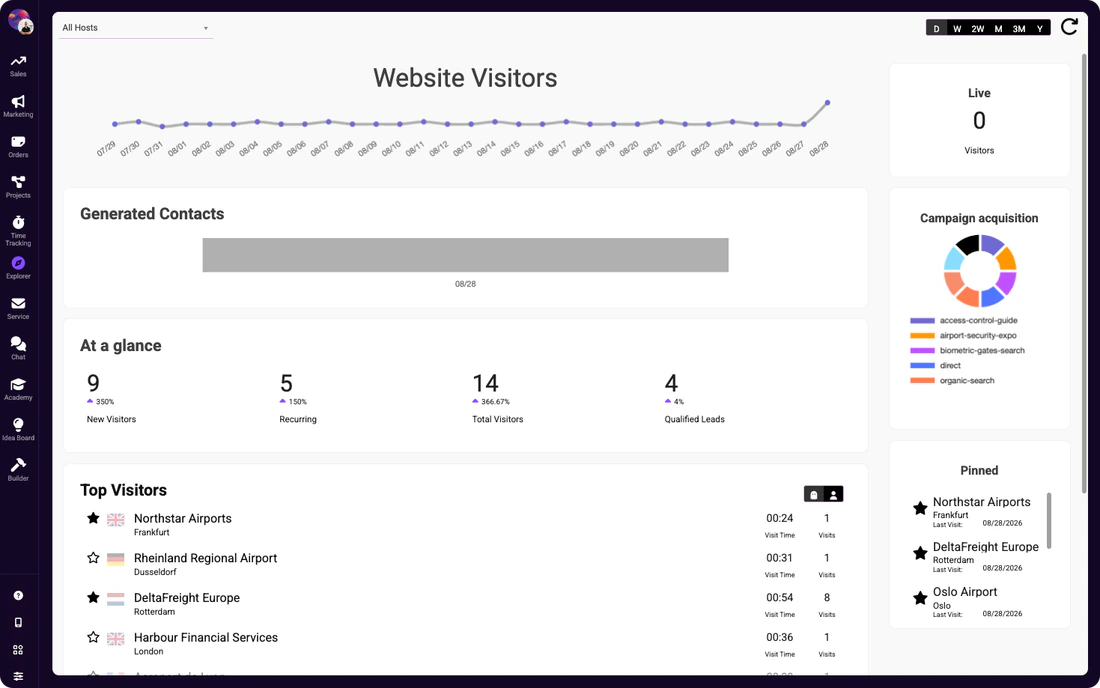
Someone fills in a form on your website: the contact is created and their earlier visits come with them. The Explorer shows how many contacts your website generated in the period.

One person, all devices
A contact who visits from the office PC and the phone is listed once, with visits, visit time and pages of all devices together.

Visit history on the contact
Sales sees in the contact record which pages a customer read before the call, which interests they showed and when they last came back.

Campaigns you can trace
For every visitor you see the campaign of their first visit, and the dashboard shows which campaigns bring new visitors.
Automations and segments
Website visits appear in the contact's activity feed, "Website visited" starts an automation, and contact filters find everyone who visited recently – or not for a long time.
New in Lead Explorer
Stop guessing. Ask the browser, talk to the visitor.
Two features that change what a visitor tool can do: they work while the visitor is still on your website.
Request company name
An interesting visitor, but no company behind the IP address – typical for home office and mobile networks. One click on "Request company name" and the visitor's browser asks once for their location. If the visitor agrees, Mister James looks up the companies at that spot.
Exactly one company: the visitor is named and linked with the matching contact. Several companies: you see the nearest one and how many others are there, and confirm the right one with one click.
You get a notification as soon as the result is there.
The browser asks only for this request and only once. The visitor decides. Coordinates are deleted after 30 days.
Show a popup to one visitor
You see a key account reading your pricing page right now? Pick any popup – an offer, a booking link, a personal message – and show it to exactly this visitor. Everybody else sees nothing.
Both features reach a visitor who stays on the page within about 90 seconds, otherwise on their next visit.
Everything in one dashboard
All you need to read your website traffic like a sales lead list.
Live visitors
See who is on your website right now, per website or across all of them.
Top visitors by relevance
Known contacts and companies first, then by time spent and number of visits.
Companies from the IP address
Business visitors are named automatically. Data centers, cloud servers and bots are filtered out.
Session recordings
Replay a visit and see how a visitor moved through your pages.
Pages and interests
Every page a visitor opened, plus interests derived from the pages, and your own activity events by URL or CSS selector.
Pin visitors
Keep promising visitors on a pinned list and come back to them at any time.
Honest figures
Visit time counts only while the page is visible. A visit counts only after a real scroll, click or tap.
Clear reports
New and returning visitors, visit duration, pages per visit, top pages, countries, languages, devices, campaigns and the busiest hours and weekdays.
How it works
From first visit to first conversation.
Add the script
Copy the tracking code from the settings into your website, or let us help you set it up.
See real visitors
Visitors appear after their first real interaction. Bots and data centers stay out.
Recognize them
Newsletter clicks, forms, IP lookup and the company name request turn anonymous visits into contacts and companies.
Act at the right moment
Pin the lead, show a popup, call, or let an automation take over – all in the same system.
Try it yourself.
Get 30 days of Mister James and experience the platform with no commitment. Explore the features, see how it fits your business and discover a smarter way to work. Start your free trial today.
100% free. No credit card needed.
No cancellation required. Your data stays private. Promise.
Made & Hosted in Germany.

The AI operating system for your business.




© Copyright 2026 by Rowisoft GmbH. All rights reserved.
Various trademarks held by their respective owners. Mister James and Rowisoft are registered trademarks of the Rowisoft GmbH.